Starting from this week, you need to use Monospaced fonts (equally-spaced fonts such as Courier, Courier New, Consolas, Fixedsys... etc.) for your codes in the homework.
Explanation in Mandarin-Chinese language can be found here.
- HTML in HTML
Convert the HTML file you generated for the Problem 3 last week (week 02) into another HTML file and name it as, for example, ~/public_html/homesrc.html , of which content is shown in the format of HTML source code (like this) in the browser. (Using <PRE> and </PRE> tags is NOT allowed!)
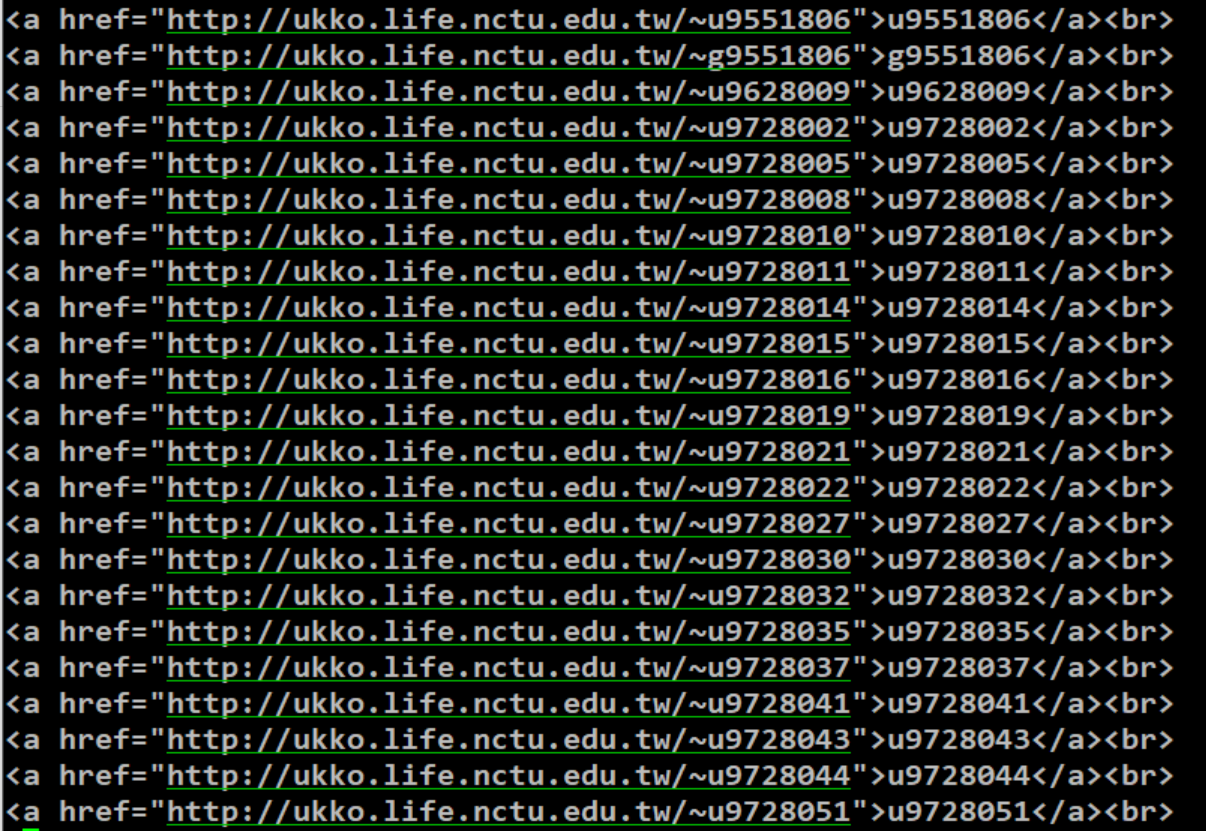
- To convert /etc/passwd at ukko into an HTML file that points to all of the student users' websites at ukko.life.nctu.edu.tw, we can use an example one-line command by
sed :
grep -E -e ^[udg][0-9a][0-9]{6} -e ^[udg][0-9]{9} /etc/passwd \

 | sed -e 's/^/<a href=\"http:\/\/ukko\.life\.nctu\.edu\.tw\/~/' \

       -e 's/:x.*s\//\">/' -e 's/:\/bin.*$/<\/a><br>/'
If we want to change the output HTML source code into the format of
<a href='http://ukko.life.nctu.edu.tw/~u9551806'>u9551806</a><br>
<a href='http://ukko.life.nctu.edu.tw/~g9551806'>g9551806</a><br>
<a href='http://ukko.life.nctu.edu.tw/~u9628009'>u9628009</a><br>
<a href='http://ukko.life.nctu.edu.tw/~u9728002'>u9728002</a><br>
<a href='http://ukko.life.nctu.edu.tw/~u9728005'>u9728005</a><br>
.....
<a href='http://ukko.life.nctu.edu.tw/~g310351020'>g310351020</a><br>
.....
that is, using the single quotes ' ' instead the double quotes " " for the hyperlinks, what should you fill in the field highlighted with yellow color in the following command?
grep -e "^[ugd][0-9a][0-9]\{6\}" -e "^[ugd][0-9]\{9\}" /etc/passwd | sed
Write the whole line command starting with grep in the PDF to be submitted by email.
-
Use
awk instead of sed to solve Problem 2; use double quotes " " inside the hyperlinks of <a href="http://........"> :
grep -E -e ^[udg][0-9a][0-9]{6} -e ^[udg][0-9]{9} /etc/passwd | awk -F: '{ }'
Write the whole line command starting with grep in the PDF to be submitted by email.
-
Use
awk instead of sed to solve Problem 2; use single quotes ' ' inside the hyperlinks of <a href='http://........'> :
grep -E -e ^[udg][0-9a][0-9]{6} -e ^[udg][0-9]{9} /etc/passwd | awk -F: '{ }'
Write the whole line command starting with grep in the PDF to be submitted by email.
Also write a short paragraph describing how you solved the Problems 1–4 above, and send the text in PDF format to me along with the hyperlinks of the HTML file of Problem 1. You can freely name your own HTML files but please specify the web links of them when you submit the homework to me.
- To calculate $\pi$ to the 20th digit, we can use:
echo "scale=20; 4*a(1)" | bc -l # calculate π with 4×arctan(1) to the 20th digit.
Explain why.
Demonstration with a figure is necessary, but you need to plot the figure by yourself. Copying the figure from any textbook or from Internet resource is NOT allowed even you specify its source.
Also note that you need to use either Equation Editor or $\LaTeX$ to generate the math equations in your word processor and convert to PDF. Do not use $*$ instead of $\times$.
Solution
- Write a shell script to calculate $n!=\prod\limits_{k=1}^n k = 1\times 2\times 3\times 4\times... \times (k-1) \times k$ for any positive integer $n$.
In addition, for the case that given $n\lt0$, print an error message "Input number must be a positive integer!!" to the user;
for $n=0$, print $1$ because by definition, $0!=1$.
Send the filename of these shell scripts including their absolute path to me and CC: to TA by email.
Hint: For the judgement of condition in bash, refer here. Using if...then would be the simplest but you could also try other syntax.
See also:
- Preview the videos before the start of classes next week:
https://youtu.be/Uy2ckFQOayQ (1/3, 45:52)
https://youtu.be/BlzKTkeQ7OA (2/3, 28:00)
- Practice the syntax of loop and how to write scripts to calculate summation and factorial. You don't yet have to submit this part.
- Give http://hackmd.io a try by yourself. This is a convenient online system to create notes with Markdown language.
Note: If you did something weird and got stuck under bash without getting the shell-prompt returned, you can hit Ctrl-C to quit the process and get the prompt returned.
jsyu@Ukko:~$ grep "[ugd][0-9a][0-9]\{6\}" /etc/passwd | awk -F: '{ print something wrong here }'
>
>
>
> ^C
jsyu@Ukko:~$